Archival Index: Turning Documentation Into Design
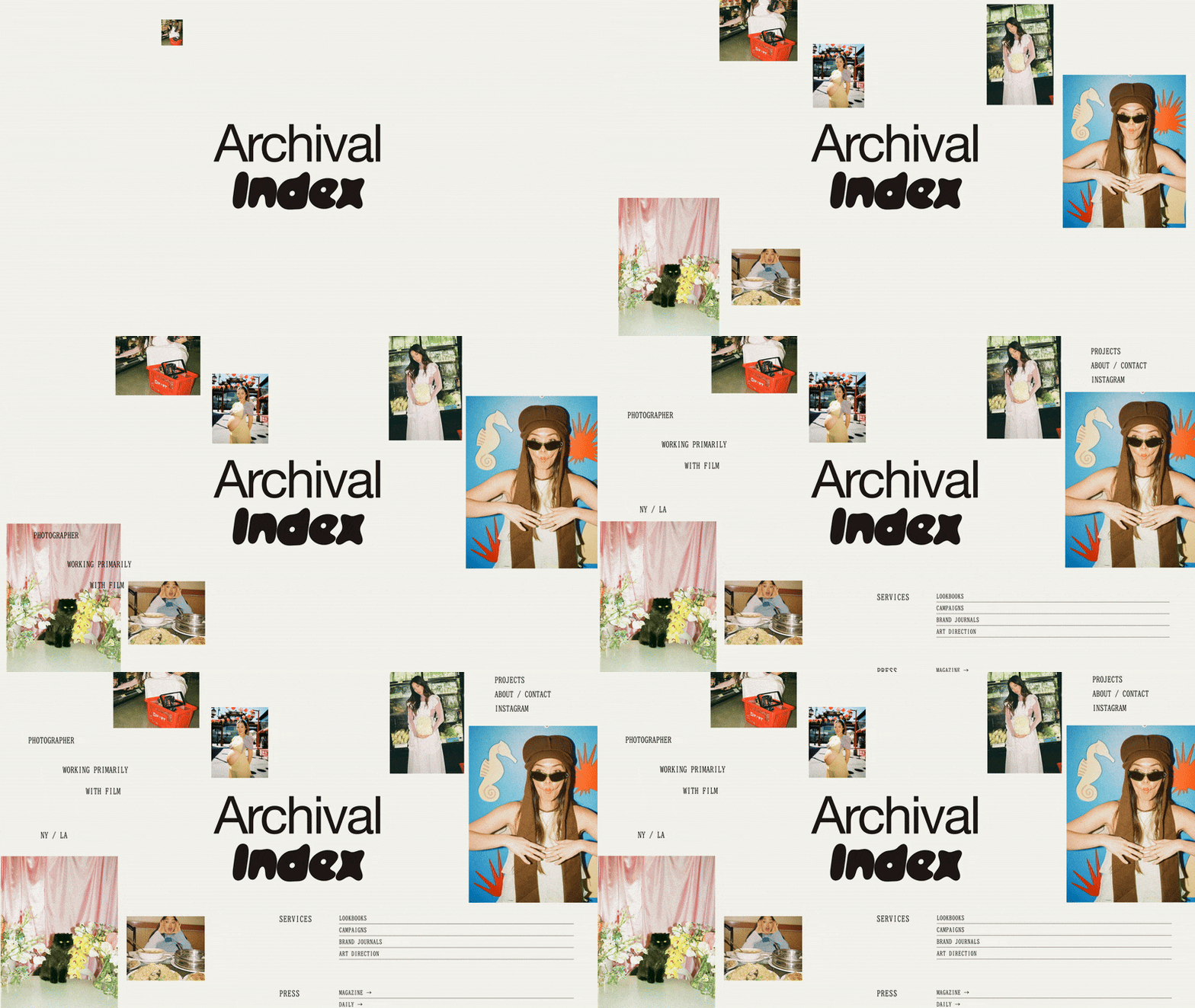
Great design isn’t merely creative—it’s logical. There’s a rationale to what goes where on a page, depending on what you want to emphasize. There’s a hierarchy behind typography choices, with big text shouting key information while small type whispers additional details.
While these practices have long been commonplace in the design world, they’re taking on new life with the Archival Index trend, identified in partnership with Puno, founder of ilovecreatives, as one of 2026’s most dominant aesthetics. Drawing from classic design and cutting-edge technology in equal measure, the approach showcases imagery with grid-based galleries, adds context with annotation, and keeps things clean with muted colors and refined typography.
Understanding Archival Index
The Archival Index trend is a celebration of information architecture. It harkens back to design school basics, with moodboard-inspired layouts, clear visual hierarchy, and strict adherence to the grid. But it has a decidedly high-tech sensibility—more spreadsheet than sketchbook. Instead of concealing the back-end, the trend exposes the infrastructure and taxonomy. Labels and tags become critical design elements, orienting the visitor and giving the layout clarity.
The result is a website that feels collected but clean, marrying the careful curation of a library with the polished feel of a gallery.
Drawing inspiration from Archival Index designs
The Archival Index aesthetic is ideal for visual-heavy websites that have a story to tell—think online stores with rich histories or portfolio projects with complex specs. But its clean approach to curation lends itself to a range of web design projects. You can nod to the trend by creating grid-based collages, communicating through annotation, and adding balance with understated elements.
Editorial grids
When laying out websites, designers have historically relied on “the grid”—a system of rows, columns, and gutters (white space) that lends order to a blank canvas. Designing on a grid ensures proper spacing and alignment, which is essential when combining lots of text and imagery.
Thanks to Squarespace’s best-in-class templates, you don’t have to design layouts from scratch, so there’s no need to dive deep on design theory. But you can choose a template that more literally references the grid. Options like Night, Reflect, and Sketchbook—with their straight lines, sharp edges, and collage-like feel—nod to moodboards and galleries, evoking the Archival Index aesthetic.
Using Fluid Engine, Squarespace’s drag-and-drop editor, you can also visualize the grid as you design and build websites. The editing grid feature divides each web page into a series of squares, enabling you to precisely align and consistently space elements as you drag and drop content blocks. Work from Squarespace’s preset grid, or customize the row count and gap size to create your own grid to work from.
Fluid Engine also empowers you to customize how each website looks on different devices—key for visual-heavy layouts, like the ones Archival Index champions. Because Squarespace offers built-in responsive design, any template you choose or layout you design will translate beautifully across devices large and small. But if you want more control, you can move and resize blocks inside the mobile layout feature to control how your galleries collapse across different breakpoints. You can also use the Layers panel to hide select content on smaller screens, keeping your layouts clean.
Annotation
The modern-day moodboard isn’t just about imagery. One of the most fun aspects of the Archival Index trend is an affinity for annotation. Labels, tags, and categories make sense of the content on the page, offering data-rich ways to tell stories and organize visuals.
When creating content on Squarespace, you can add categories and tags to organize blog posts, events, products, and videos. (Categories group content by general type or topic, while tags can get more granular.) While these labels are handy for keeping your site’s back-end in order, they’re also beneficial for the user experience (UX) of your website. Thoughtful tags and categories can make site search more efficient and improve related product recommendations. You can also use them to segment your content, creating thematic collections to display in archive blocks and summary blocks.
Make your categories and tags part of the story by pinning them near related content. This will keep the labels static as visitors scroll, helping them understand the story behind each set of visuals. You can also add context by pairing text blocks and image blocks to create custom collection cards. And you can turn data into a design element by creating a tag cloud block that helps visitors understand what to expect from your website.
To annotate your content in even greater detail, use the text highlight tool. Underline or circle key information, or use the freehand and scribble features to give your design a human touch. These marks and labels will act like notes in a sketchbook or information cards on a gallery wall, telling a fuller story without distracting from the visuals.
Visual hierarchy
Though the Archival Index trend takes a empathetic approach to imagery, it still feels decidedly clean and refined. That’s because it relies on clear visual hierarchy to organize each page, guiding the eye to key elements first and less pressing content later.
People tend to follow two basic patterns when viewing websites: They either start at the top of the page, then move down the left side (F-shaped pattern),. oOr they scan the page from left to right, starting at the top and working their way down (Z-shaped pattern). Keep this in mind as you design. Place vital images and valuable information in these focal points, and ensure they’re bigger and bolder than other elements on the page. That way, visitors know exactly where to look.
Since you’re playing with so many images, you’ll also want to keep your palette pared down. Neutrals offer the perfect complement to your moodboard-inspired layouts, foregrounding your images without overwhelming the eye.
And consider keeping your typography choices equally understated. Favor fonts that feel crisp and clean—great at conveying information, but unlikely to clash with your design. Help visitors understand the importance of different text elements by sticking to a clear headline hierarchy. As you work your way from H1 to H4—and then to body (or paragraph) copy—your typography should get smaller and leaner. This will ensure your website is user-friendly and easy to navigate, and it has the added benefit of being great for search engine optimization (SEO) and accessibility. When your website’s HTML code thoughtfully communicates the structure behind each page, it’s easier for search engines to crawl and for people using screen readers to understand.
Communicate through curation with the Archival Index trend
The Archival Index trend is a great reminder that artistry and utilitarianism aren’t mutually exclusive. In fact, the best designs often combine the two. Whether you draw inspiration from part of the aesthetic or seek to recreate it in full, it will ground you in design best practices while inviting you to tell visual stories in rich and complex ways.
Read about more 2026 trends in web design:
Want more?
Check out Squarespace Circle, Squarespace’s program for professional designers and web design agencies. Along with exclusive content, discounts, and other perks, Circle brings experts together from across the globe to exchange advice while connecting with new clients and collaborators.